

Cheap Inboxes
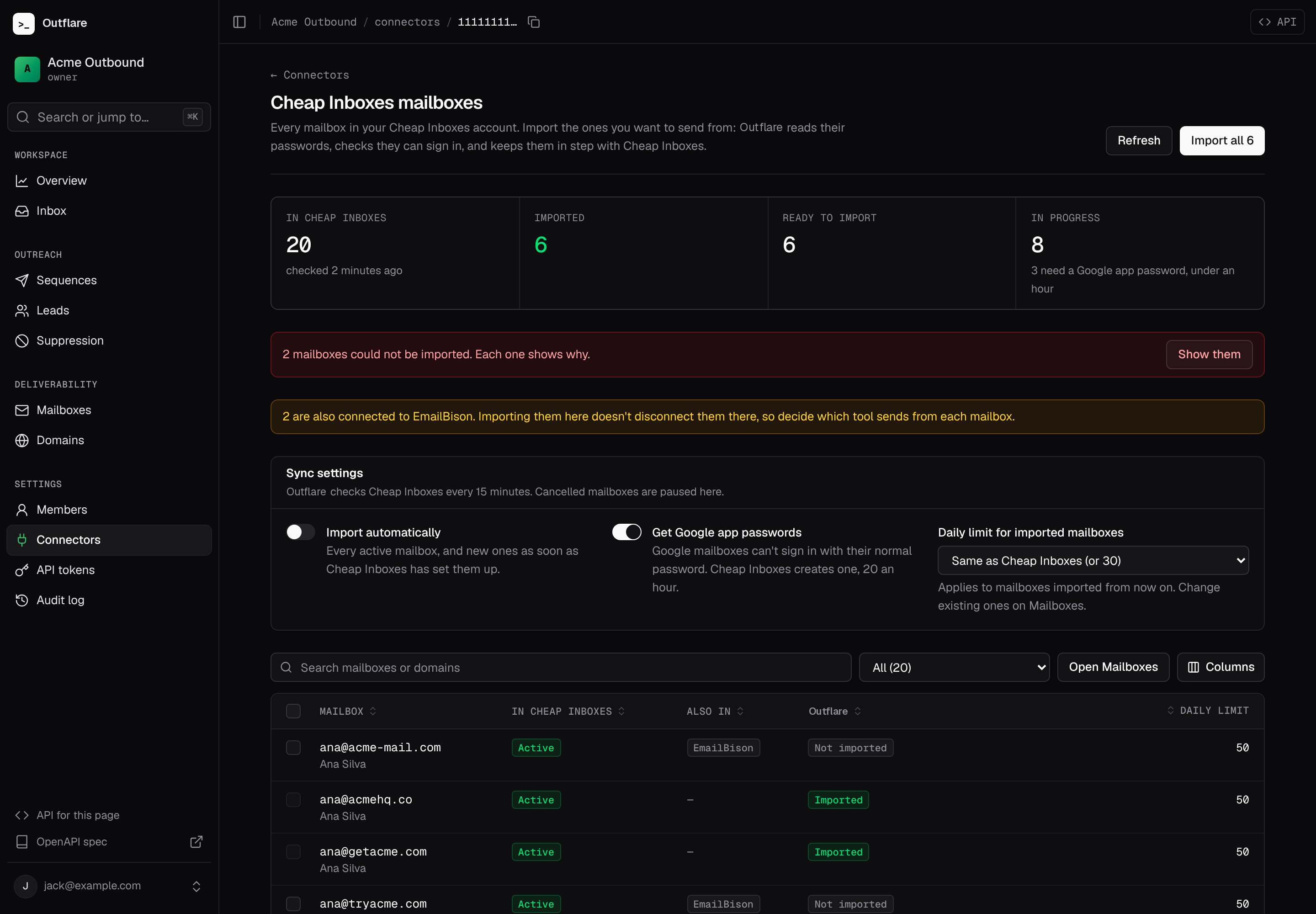
Shipped Connect a Cheap Inboxes account with its API key. Outflare lists every mailbox in it, imports the ones you choose, and keeps them in step as Cheap Inboxes sets up new mailboxes or cancels old ones. Everything here works the same from the web app, the API and the MCP server, so an agent can do it without the dashboard.
Connect
Section titled “Connect”- In Cheap Inboxes, open Integrations → API and create a key. It starts with
ci_live_. - In Outflare, open Connectors, choose Cheap Inboxes and paste the key. Outflare tests it before saving and encrypts it with your instance’s
OUTFLARE_SECRET_KEY, like mailbox passwords. - Open the connection to see its mailboxes. The first read takes a few seconds for a few hundred mailboxes.
Or with the API (scope integrations.manage):
curl -X POST localhost:8080/v1/workspaces/$WS/integrations \ -H "Authorization: Bearer $OUTFLARE_TOKEN" -H "Content-Type: application/json" \ -d '{"connector":"cheapinboxes","credentials":{"api_key":"ci_live_..."}}'Import
Section titled “Import”Choose Import all, or tick mailboxes and choose Import selected. For each one, Outflare reads its password from Cheap Inboxes and runs the same SMTP, IMAP and DNS checks as a CSV import. Mailboxes that Cheap Inboxes is still setting up wait, and are imported as soon as they are active.
# Everything that is active, plus anything still being set up once it is readycurl -X POST localhost:8080/v1/workspaces/$WS/integrations/$INTEGRATION/mailboxes/import \ -H "Authorization: Bearer $OUTFLARE_TOKEN" -H "Content-Type: application/json" -d '{"all":true}'To import only some, send {"emails": ["ana@acme-mail.com", "ben@acme-mail.com"]} or {"external_ids": [...]} instead. The answer says how many were queued, how many wait for Cheap Inboxes, and which addresses it didn’t find.
Follow progress in the list (scope mailboxes.read). Each mailbox has an import_state:
import_state |
Meaning |
|---|---|
available |
In Cheap Inboxes, not imported |
queued |
Being imported now |
waiting |
Still being set up at Cheap Inboxes; imported once active |
app_password |
Waiting for a Google app password (see below) |
imported |
In Outflare; mailbox_id and mailbox_status say how it is doing |
failed |
Could not be imported; import_error says why |
curl "localhost:8080/v1/workspaces/$WS/integrations/$INTEGRATION/mailboxes?import_state=failed" \ -H "Authorization: Bearer $OUTFLARE_TOKEN"Google mailboxes need app passwords
Section titled “Google mailboxes need app passwords”Google refuses a mailbox’s normal password over SMTP and IMAP. So for each Google mailbox, Outflare first asks Cheap Inboxes to create an app password, then imports the mailbox with it. Cheap Inboxes creates 20 an hour, three at a time, so a few hundred Google mailboxes take most of a day. Outflare paces the requests for you and the page shows how long is left. Microsoft 365 mailboxes import straight away.
If you would rather connect Google mailboxes without passwords, through an admin connection, turn off Get Google app passwords.
Mailboxes also used by another tool
Section titled “Mailboxes also used by another tool”Cheap Inboxes knows when a mailbox is also connected to EmailBison, Instantly, Smartlead, PlusVibe or Apollo, and the page shows it under Also in. Importing a mailbox doesn’t disconnect it there. Decide which tool sends from each mailbox, or both will count against its daily limit.
Keep in step
Section titled “Keep in step”Outflare re-reads the account every 15 minutes. If your instance’s PUBLIC_URL is an https address, it also subscribes to Cheap Inboxes webhooks, so new and changed mailboxes show up within seconds. Webhooks are signed, and checked against the secret Cheap Inboxes gave when they were created.
- New mailboxes appear as
available, or are imported straight away with Import automatically on. - Mailboxes cancelled at Cheap Inboxes are paused in Outflare, so nothing sends from them, with the reason “Cancelled at the supplier”.
- Disconnecting the account removes the webhook. Imported mailboxes stay.
Settings live on the connection (scope mailboxes.manage):
curl -X PATCH localhost:8080/v1/workspaces/$WS/integrations/$INTEGRATION/mailbox-sync \ -H "Authorization: Bearer $OUTFLARE_TOKEN" -H "Content-Type: application/json" \ -d '{"auto_import":true,"app_passwords":true,"daily_limit":30}'daily_limit applies to mailboxes imported from then on; null keeps Cheap Inboxes’ own limit. To read the account again now, POST …/integrations/$INTEGRATION/mailboxes/sync.
Let Cheap Inboxes push mailboxes in
Section titled “Let Cheap Inboxes push mailboxes in”Built, not yet tested live Cheap Inboxes can push mailboxes straight into a sequencer, and it supports a self-hosted EmailBison. Outflare answers the part of the EmailBison API used for that, so you can add Outflare in Cheap Inboxes as if it were EmailBison:
- In Outflare, open API tokens and make a token with
mailboxes.readandmailboxes.manage. - In Cheap Inboxes, add a sequencer connection, choose EmailBison, and set:
- Base URL:
https://<your Outflare host>/emailbison/<workspace id> - API key: the Outflare token
- Base URL:
The Cheap Inboxes connection page in Outflare shows the base URL to copy under Let Cheap Inboxes push mailboxes in.
Pushed mailboxes go through the same SMTP, IMAP and DNS checks as any import. If Cheap Inboxes removes one, it is paused in Outflare, never deleted. Your instance has to be reachable from the internet.
This was built from EmailBison’s public API and hasn’t been tested against a live Cheap Inboxes push yet. Every call is logged with its field names (never the values), so if Cheap Inboxes asks for something Outflare doesn’t answer yet, you can see exactly what:
curl localhost:8080/v1/workspaces/$WS/emailbison-compat/calls -H "Authorization: Bearer $OUTFLARE_TOKEN"| EmailBison call | What Outflare does |
|---|---|
GET /api/users |
Answers with the workspace |
GET /api/sender-emails, GET /api/sender-emails/{id or email} |
Lists mailboxes as senders, paginated like EmailBison |
POST /api/sender-emails/imap-smtp, POST /api/sender-emails/bulk |
Imports mailboxes |
PATCH /api/sender-emails/{id} |
Changes the daily limit and name; a new password re-imports the mailbox |
DELETE /api/sender-emails/{id} |
Pauses the mailbox |
PATCH /api/warmup/sender-emails/enable and disable |
Turns warm-up on or off |
Buy through infrastructure plans
Section titled “Buy through infrastructure plans”With Cheap Inboxes connected, an infrastructure plan can buy its domains and mailboxes on your Cheap Inboxes account. The plan’s quote comes from Cheap Inboxes: which domains are free and what they cost, then the price today and per month. Approving the plan places the order once. The plan id is sent as Cheap Inboxes’ idempotency key, so a retry can never buy twice. Domains you already own are sent as existing, so you pay only for their mailboxes. As mailboxes go live at Cheap Inboxes, the plan follows them and they are imported as above. Retiring a mailbox in a plan cancels it at Cheap Inboxes at the end of its billing period.
For agents
Section titled “For agents”The MCP server has list_supplier_mailboxes, import_supplier_mailboxes, sync_supplier_mailboxes and update_supplier_sync. A typical run: list the account’s connectors, list its mailboxes, import all, then check back on the ones in app_password or failed.
Other suppliers
Section titled “Other suppliers”Cheap Inboxes is the first mailbox supplier. Others plug into the same interface, so the page, the API and the MCP tools above work for them unchanged. See Mailbox suppliers in the connectors guide.