

Sending servers
Shipped Grouping by SMTP host, daily IP blocklist checks, automatic pause and resume, a shared daily limit enforced by the policy check, the Servers page in the web app, and API and MCP tools. Connectors for SMTP vendors’ APIs come later.
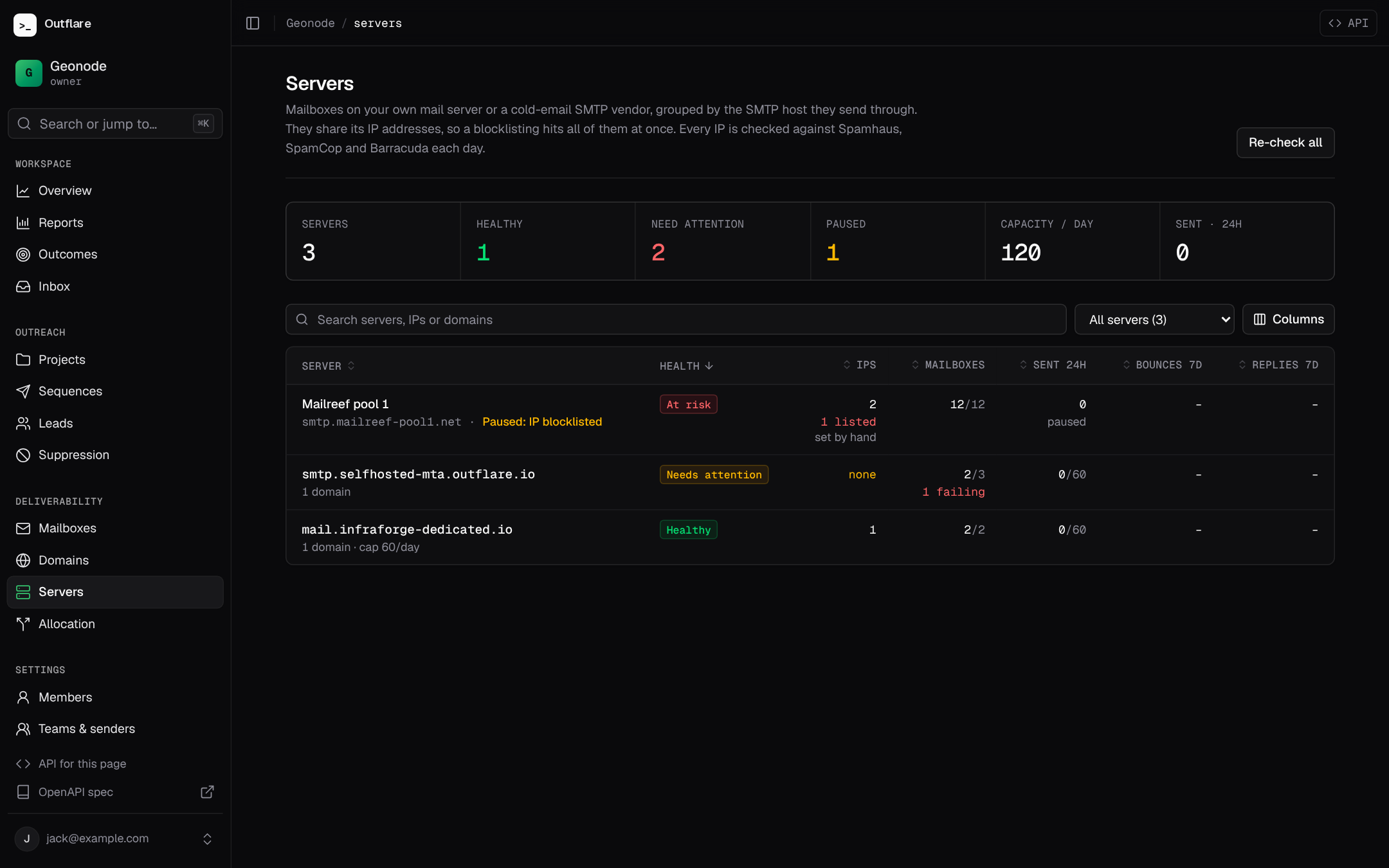
Some mailboxes don’t live at Google or Microsoft. Cold-email SMTP vendors such as Mailreef and Infraforge, and self-hosted mail servers (Postal, Postfix, KumoMTA), give you many mailboxes that all sign in to one server and send from the same few dedicated IPs. One listed IP then hurts every mailbox on it, and new IPs can only carry so much mail a day while they warm up. Outflare watches and caps those shared IPs as a sending server.
Where servers come from
Section titled “Where servers come from”Connect the mailboxes as usual, by CSV or API with their SMTP and IMAP details. Every mailbox outside Google and Microsoft is grouped by its SMTP host into a server, on its own. Mailboxes that sign in to smtp.box1.example share one server; a second host is a second server. Google and Microsoft mailboxes have no server, since their IPs are shared by the whole provider.
In the web app they are under Deliverability → Servers, worst first:
Over the API, list them and a server’s mailboxes with:
curl https://outflare.example.com/v1/workspaces/$WS/sending-servers -H "Authorization: Bearer $OUTFLARE_TOKEN"curl "https://outflare.example.com/v1/workspaces/$WS/mailboxes?server_id=$SERVER" -H "Authorization: Bearer $OUTFLARE_TOKEN"A server can be removed once no mailbox uses it.
What is checked
Section titled “What is checked”A server’s IPs are its host’s A and AAAA records. If your server accepts mail on one address and sends from others, set the sending IPs by hand with ips (and set ips: null to go back to DNS). Each IPv4 address is checked against Spamhaus ZEN, SpamCop and Barracuda when the server is added and every day after. IPv6 addresses are listed but not checked yet. To check now, for example after a delisting request, use POST /v1/workspaces/{ws}/sending-servers/{id}/check, or .../sending-servers/check for all of them.
Automatic pause
Section titled “Automatic pause”When a check finds one of a server’s IPs on a blocklist, the server is paused on its own (paused_by: blocklist), with the listing as the reason. Once a later check finds every IP clear, it resumes on its own. Both are written to the audit log. Turn this off for a server with pause_on_listing: false. A server you pause yourself stays paused until you resume it, whatever the checks say.
Health and what to fix
Section titled “Health and what to fix”Open a server to see what to fix, each IP on each blocklist with a link to request removal, its settings and its mailboxes:
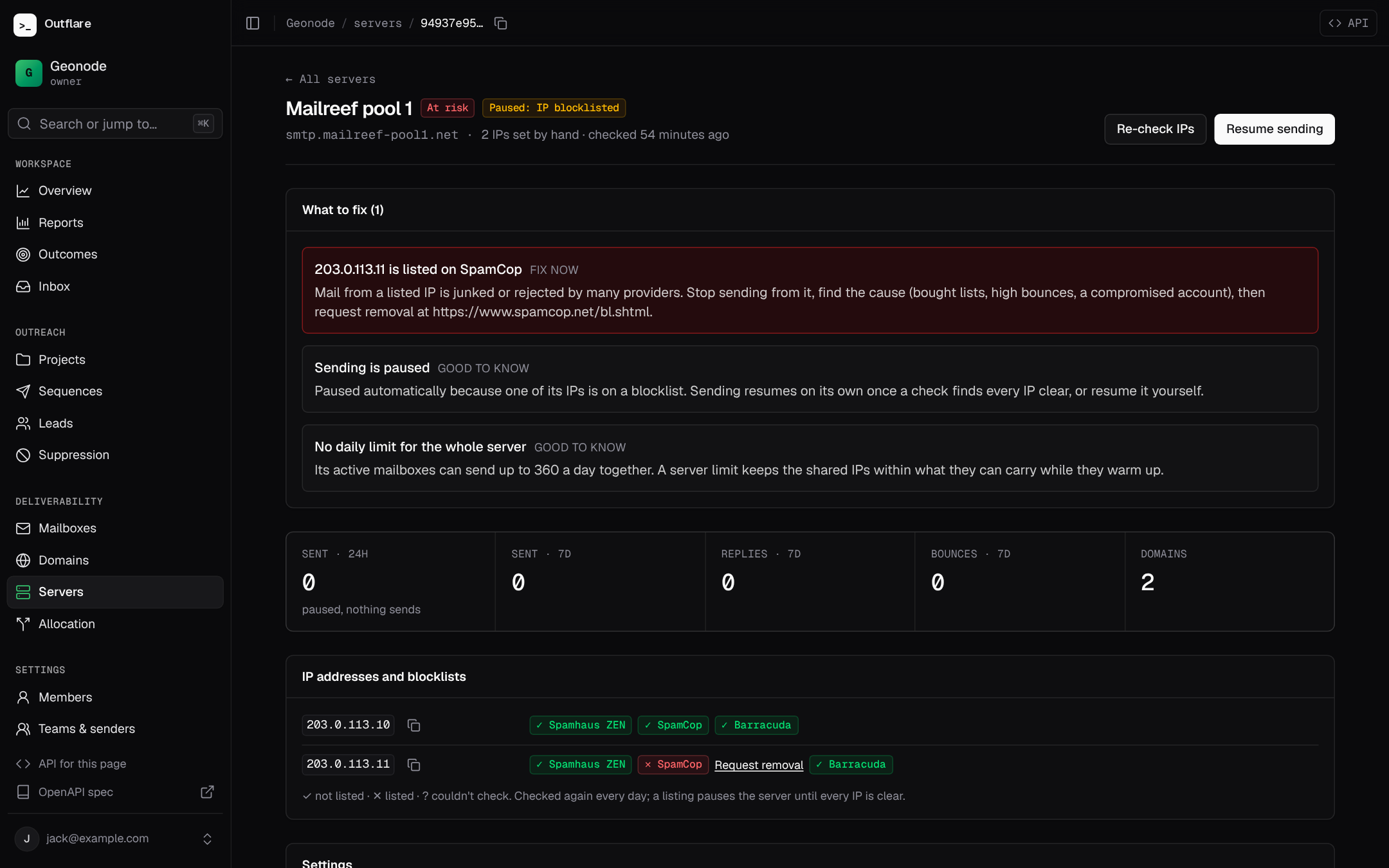
Each server has a health, Healthy, Needs attention, At risk or Checking, from its issues:
| Issue | Severity | Fix |
|---|---|---|
ip_blocklisted |
critical | Stop sending from the IP, find the cause (bought lists, high bounces, a compromised account), then request removal from the list. |
bounce_rate |
warning over 2%, critical over 5% | Over the last 7 days, once 20 or more emails were sent. Verify your lead lists. |
no_ips |
warning | The host has no A or AAAA record. Set the sending IPs by hand. |
mailboxes_failing |
warning | Fix the sign-in of the mailboxes shown. If all of them fail, the server itself may be down. |
no_server_limit |
info | Shown once a server has 10 or more mailboxes and no shared limit. |
paused, no_mailboxes |
info | Shown so you know. |
Settings
Section titled “Settings”With PATCH /v1/workspaces/{ws}/sending-servers/{id} (scope mailboxes.manage):
| Setting | Field | Effect |
|---|---|---|
| Pause or resume | status: paused or active |
Paused: no sequence or test emails go out from any of its mailboxes. Leads wait with the reason server_paused. Replies you write in the inbox still send. |
| Server daily limit | daily_limit: 1 to 1000000, or null |
The most emails all its mailboxes send together in any 24 hours, on top of each mailbox’s and domain’s own limits. Leads over it wait with server_daily_limit. |
| Automatic pause | pause_on_listing |
On by default. |
| Sending IPs | ips: a list, or null for DNS |
For servers that send from other addresses than their SMTP host. |
| Name and notes | name, notes |
For example the vendor and the order the IPs came with. |
curl -X PATCH https://outflare.example.com/v1/workspaces/$WS/sending-servers/$SERVER \ -H "Authorization: Bearer $OUTFLARE_TOKEN" -H "Content-Type: application/json" \ -d '{"name": "Mailreef box 1", "daily_limit": 1500}'Agents use the list_sending_servers, get_sending_server, update_sending_server and check_sending_server MCP tools.
What about SendGrid, Mailgun or Amazon SES?
Section titled “What about SendGrid, Mailgun or Amazon SES?”Mainstream sending services (SendGrid, Mailgun, Amazon SES, Postmark, SMTP2GO, Mailjet, Brevo, Resend, SparkPost) require opt-in consent and forbid cold email in their terms, and cold mail sent through them tends to land worse than mail from real mailboxes. Outflare doesn’t offer them as a sending path. Cold-email SMTP vendors and your own mail server are covered here.