

Mailbox allocation
Shipped Automatic or suggested mailbox assignment for Outflare sequences and for EmailBison, Instantly and Smartlead campaigns, with teams, senders, priorities, locks, undo and agent limits. Apollo is watched, not managed.
Teams with dozens or thousands of mailboxes spend hours deciding which inboxes go on which campaign, and get it wrong in ways that hurt: two campaigns hammering the same inbox, a follow-up arriving from a different sender than the first email, or a campaign quietly starved of capacity. Outflare does this for you, by rules you can read, and tells you why it did each thing.
The rules
Section titled “The rules”- One sequence per mailbox. Each mailbox sends for one sequence at a time. The database enforces this, so no API call, agent or integration can break it.
- Follow-ups never change mailbox. A follow-up always goes from the mailbox that sent the lead’s first email, in the same thread. A mailbox that has to move while leads are mid-sequence drains first: it takes no new leads, finishes those follow-ups, then moves.
- Only ready mailboxes get new work. A mailbox is ready when it is active, its domain is not paused or blocklisted and has SPF, its warm-up ramp is done, and its 7-day inbox placement is at least 75%. A mailbox that stops being ready keeps finishing its follow-ups but takes no new leads.
- Every change has a reason, recorded with who or what made it, and can be undone.
How much a sequence gets
Section titled “How much a sequence gets”Give a sequence new leads per day or a daily send target (Settings). With only new leads per day, it gets capacity for that number times its steps. When you start sending, Outflare allocates straight away; after that it plans again every minute and as soon as a mailbox or sequence changes.
A sequence with neither, and no mailboxes assigned by hand, can’t be started: Outflare tells you to set one.
Who gets which mailbox
Section titled “Who gets which mailbox”When a sequence is short, Outflare looks for free, ready mailboxes in this order:
- Mailboxes of the sequence’s preferred senders, such as the account owner for an ABM sequence.
- Its team’s senders.
- Shared senders, which belong to no team.
- Another team’s senders, which needs a member of that team (or an owner or admin) to approve.
Within each group it spreads across domains, then prefers the largest daily limits. If nothing free is left, a higher-priority sequence may take mailboxes from a lower-priority one, down to that sequence’s never go below minimum. Sequences of equal priority never take from each other.
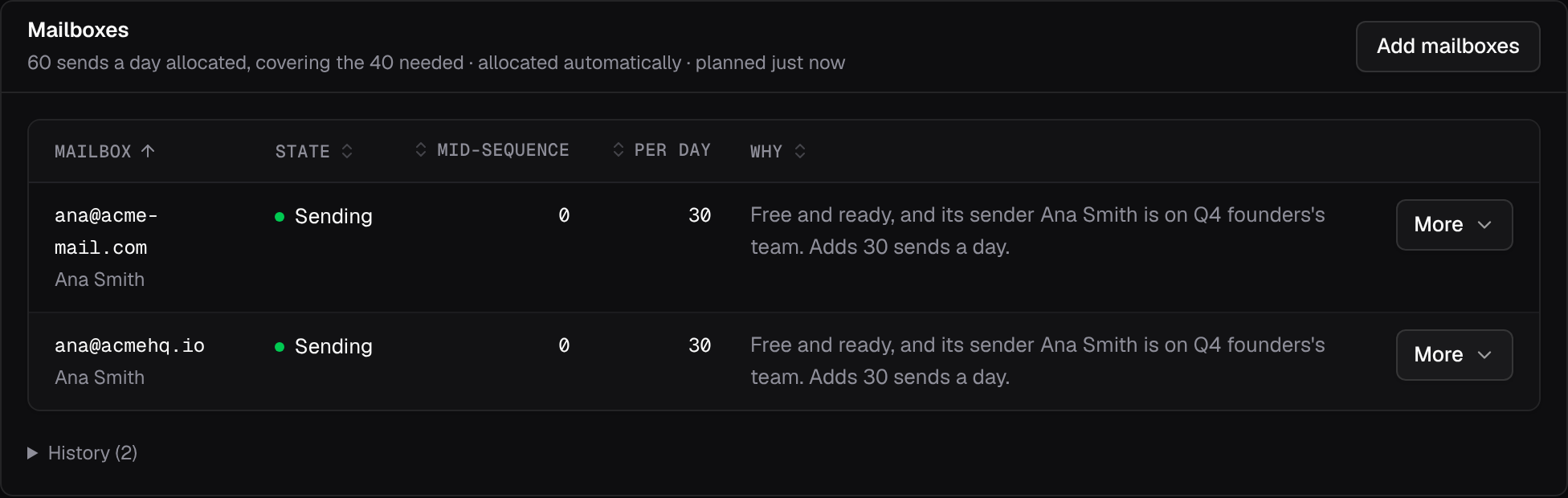
When a sequence is still short, its Mailboxes card says by how much and why, for example “Short by 40 sends a day: 3 not ready: still warming up”.
Teams and senders
Section titled “Teams and senders”A sender is who a mailbox sends as: a person, a persona, or a shared identity such as “Acme Partnerships”. Senders belong to one or more teams, or to none (shared). Teams own sequences and senders.
You confirm which sender each mailbox is; Outflare never guesses. Name a sender exactly like its mailboxes’ display name and Teams & senders offers to confirm the matches in one click. A workspace without teams shares every mailbox and needs no senders at all. Once you add teams, a mailbox without a confirmed sender isn’t allocated.
Automatic or suggest
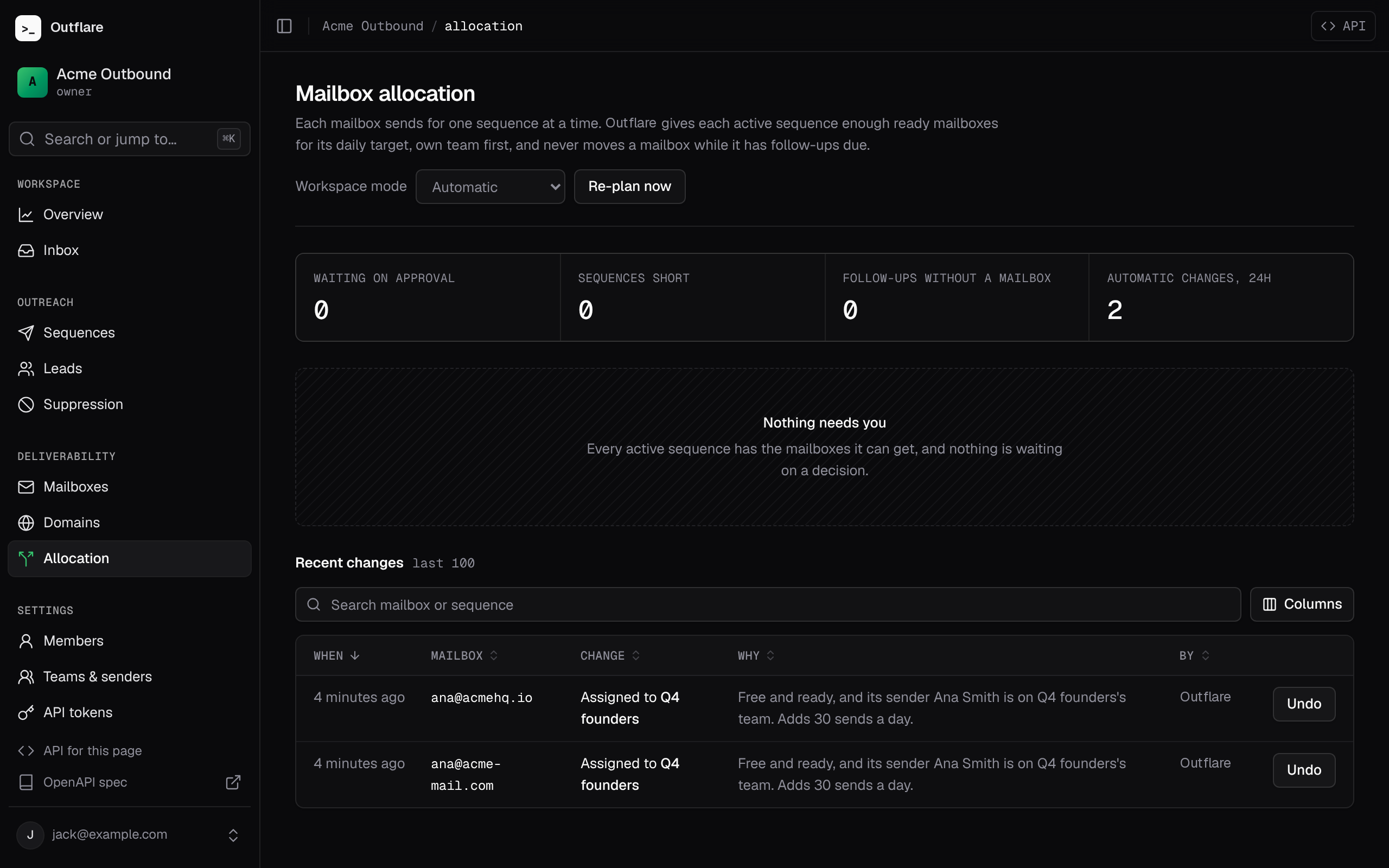
Section titled “Automatic or suggest”In automatic mode, the default, changes happen straight away and show under Allocation with their reasons. In suggest mode they wait for someone to apply them. Set the mode for the workspace, override it for a team, or for one sequence.
Pausing, locks and doing it by hand
Section titled “Pausing, locks and doing it by hand”- Pausing a sequence keeps the mailboxes that still have follow-ups due and frees the rest. A draft holds nothing unless you assign mailboxes to it by hand.
- Locks keep a mailbox on one sequence, on one team’s sequences, or out of automatic allocation entirely (manual only), optionally until a date.
- By hand, you can always assign mailboxes to a sequence or free them, from the sequence’s Mailboxes card, the Mailboxes page or the API. A busy mailbox drains first.
- If a mailbox is removed while leads are mid-sequence, their follow-ups wait. Under Allocation, cancel them, or hand them off to another of the sequence’s mailboxes as a fresh email rather than a reply.
Agents
Section titled “Agents”Agents follow the same rules as people. Their limits live on their API token:
| Limit | What it does |
|---|---|
| Daily send budget | Most emails a day across every sequence the token started. Leads over budget wait until tomorrow (token_daily_budget). |
| Highest priority | The highest priority its sequences may have. |
| May take mailboxes | Whether its sequences may take mailboxes from lower-priority sequences. Off by default: each such move waits for a person to approve. |
| Team | The team its new sequences belong to. |
A token can’t change its own limits, or give another token looser ones than it has. Sequences an agent creates are marked “started by agent”.
Campaigns in other sequencers
Section titled “Campaigns in other sequencers”Connect an EmailBison, Instantly or Smartlead account under Connectors and its mailboxes and campaigns join the same allocation. Outflare reads each account every 5 minutes; Read now on the Allocation page reads it straight away.
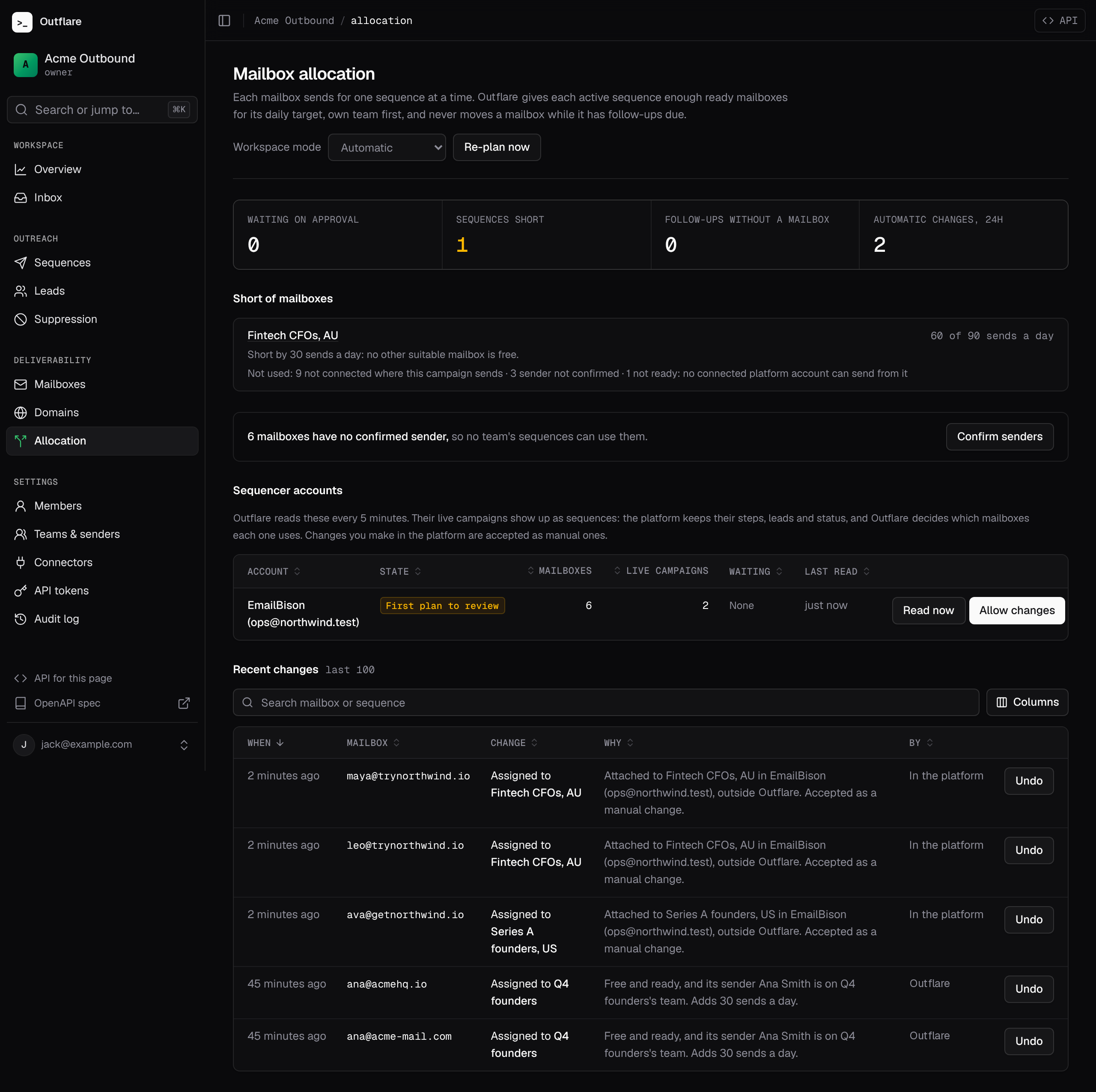
- Each live campaign becomes a sequence that says where it runs. The platform keeps its steps, leads, schedule and status. Outflare decides which mailboxes it uses and adds or removes them in the platform. Set a daily send target on it to start allocating.
- Mailboxes that exist only in the platform are added without a login. They can serve that platform’s campaigns, but Outflare never sends from them, reads their inbox or warms them up. If you use teams, confirm their sender like any other mailbox.
- Nothing moves until you review. A newly connected account’s first plan is only suggested. Check the suggestions, then choose Allow changes.
- Follow-ups still stay put. Platforms don’t say which leads each mailbox owes follow-ups, so a mailbox taken off a platform campaign stays for the campaign’s sequence length (14 days unless the platform says) before it is removed.
- Changes in the platform count. Adding or removing a mailbox in the platform itself is accepted as a manual change, and shows in the history as made in the platform.
- Stale data never drives a plan. If an account can’t be read for 30 minutes, its mailboxes count as busy until it can.
- Apollo picks the sending mailbox for each contact itself, so it is only watched. Connecting Apollo (also used for lead data) flags any of your mailboxes that are connected there too, since Apollo may send from them, and allocation keeps using them. Apollo’s sequences don’t become sequences here.
- Paused sending servers count like paused domains: their mailboxes get no new work until the server is resumed.
# What the allocator would change now (changes nothing)curl https://outflare.example.com/v1/workspaces/$WS/allocation/plan -H "Authorization: Bearer $OUTFLARE_TOKEN"
# A sequence's mailboxes, capacity, suggestions and historycurl https://outflare.example.com/v1/workspaces/$WS/sequences/$SEQ/allocation -H "Authorization: Bearer $OUTFLARE_TOKEN"
# Connected sequencer accounts, and their first plan's reviewcurl https://outflare.example.com/v1/workspaces/$WS/platforms -H "Authorization: Bearer $OUTFLARE_TOKEN"curl -X POST https://outflare.example.com/v1/workspaces/$WS/platforms/$ID/review -H "Authorization: Bearer $OUTFLARE_TOKEN"
# Assign by hand; a busy mailbox drains into the sequencecurl -X POST https://outflare.example.com/v1/workspaces/$WS/mailboxes/assign \  -H "Authorization: Bearer $OUTFLARE_TOKEN" -H "Content-Type: application/json" \  -d '{"sequence_id": "'$SEQ'", "mailbox_ids": ["'$MB'"]}'
The API reference lists every endpoint under allocation. Agents use the MCP tools get_sequence_mailboxes, get_allocation_attention, assign_mailboxes, list_platforms, review_platform_plan and friends.